The Future is Here Now: Using Adobe Firefly for Custom T-Shirt Designs
The Future is Here Now: Using Adobe Firefly for Custom T-Shirt Designs
The future is here now and it's absolutely crazy! With Firefly, Adobe's new and extremely powerful AI powered design software, unleashing your creativity and bringing your ideas to life has never been easier. Whether you're a seasoned designer or just starting out, here's a comprehensive guide to using Adobe Firefly as a tool for crafting stunning and memorable t-shirt designs and one-of-a-kind fashion for yourself and your fans.
Familiarize Yourself with the Interface
What will you dream up today with Firefly? As you dive into the design process, take some time to explore and familiarize yourself with the Adobe Firefly interface. Right now Adobe Firefly offers some really cool tools with even more in the works for the future. Get to know the various tools, features, and functionalities available to you:
- Text to image: Create unique images from a text prompt and apply style presents.
- Generative fill: Use brush to remove objects or pain new ones from text descriptions (added to Photoshop 2023).
- Text effects: Apply styles or textures to text with a text prompt.
- Generative recolor: Generate color variations of your vector artwork from a detailed text description.
- 3D to image(coming soon): Create a 3D scene and use a text prompt to generate an image.
- Text to vector(coming soon): Generate SVGs from a detailed text description.
As Adobe releases more offerings as part of Firefly, we'll be sure to post more about how MerchYeah shop owners are using the new tools. For this post, we're primarily going to focus on Text to image.
Step 1: Getting Started with Text to image
Your inspiration and ideas are what drive artificial intelligence. AI can be an infinitely-powerful tool, but it's still simply a tool, and it's only as good as your ideas and how you use it. Adobe Firefly's Text to image starts with a prompt, basically a prompt is a detailed description of what you want it to generate. The success of a prompt depends on how well you can articulate a detailed description of what you're envisioning.
When creating your prompts, you'll inevitably have some trial and error, but it really is a fun process and the more you use the tool the better you'll get at generating cool designs.
Here are a few Adobe Firefly prompt ideas and tips:
- Start with your subject: What is the primary feature or subject of the design? A skull, a palm tree, an elephant, a daffodil bouquet... try tons of different things that might appeal to you or your fans.
- Describe the subject in detail: The more detailed your description, the better your design will be. Is it cute, edgy, futuristic, cartoon, happy, evil, under water, etc?
- Prompting the effect or style: Adobe Firefly has tons of amazing effect pre-sets to explore that include different art movements, themes, techniques, effects, and more.
For T-Shirt designs, we've found that adding "as t-shirt design on a white background" does a really good job of getting the AI to create designs that can be modified for use on MerchYeah custom printed apparel and products.
Step 2: Honing your designs
- Set your shape and aspect ratio: Firefly has preset aspect ratios for Landscape(4:3), Portrait (3:4), Square (1:1), and Widescreen 16:9). For t-shirt designs, the Portrait and Square options are usually the best options.
- Experiment with different color and tone combinations: and shapes to create a visually striking and harmonious design. Use Adobe Firefly's color and tone palettes and customization options to find the hue, vibrancy, and tone for your design.
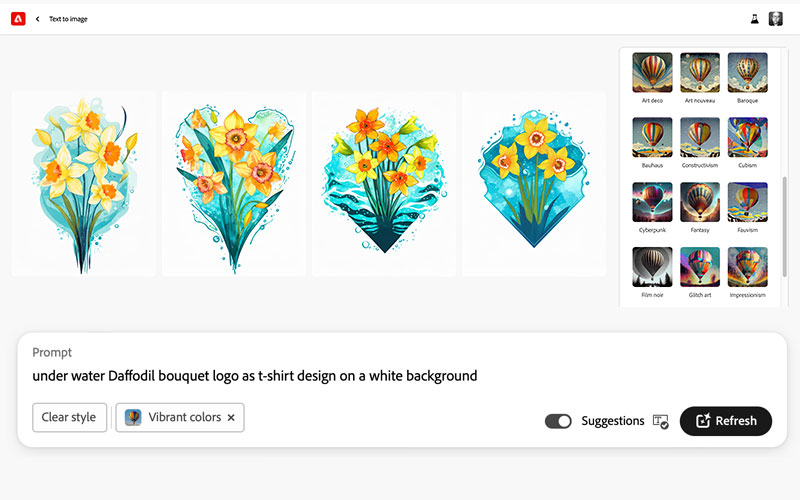
Step 3: When you see something you like, download it right away
Since the AI is nearly infinite in terms of how many designs it can compose, and each time you refresh a design, you can get a completely different result; it's crucially important to download the things you like as soon as you see them. Take our word for it, there's nothing worse than refreshing a losing a design that was close to perfect.
Step 4: Customization and Incorporating your branding
Adobe Firefly will be constantly adding new customization features over time, but for us the power of the AI right now is in creating a base for your design, not the whole thing. Once you've got that base-level design, we recommend bringing it into Photoshop or your favorite design app so you can add your branding, clean up the design and customize the fine details to make the finished design uniquely yours.
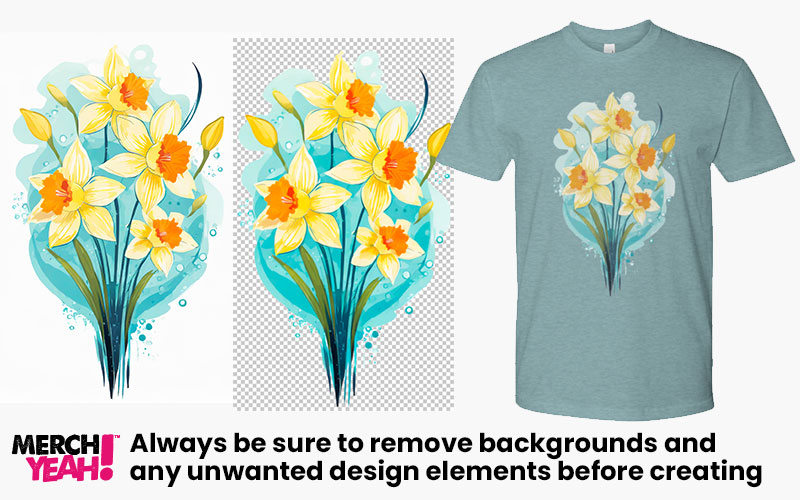
Step 5: Remove that background!
Unfortunately, right now Adobe Firefly does not output .png files and instead only exports .jpg or .jpeg files. While the size of the exported designs are plenty large enough to use for custom merch, you will most definitely need to remove the backgrounds from your designs. You'll also need to resave your files as either a .psd file or .png file before uploading and creating products on MerchYeah.
Unleash Your Creativity with Adobe Firefly
With Adobe Firefly as your creative companion, the possibilities for designing breathtaking t-shirt graphics are endless. Embrace the power of this versatile software to craft designs to use for unique custom fashion for your self and your fans. Elevate your t-shirt designs from ordinary to extraordinary with Adobe Firefly.

Create merch now.
Start selling in minutes or
order for your next event.